THE WIZARDS
Agenda Wizard
Build clear, structured agendas in seconds — so your team
spends less time preparing and more time achieving.
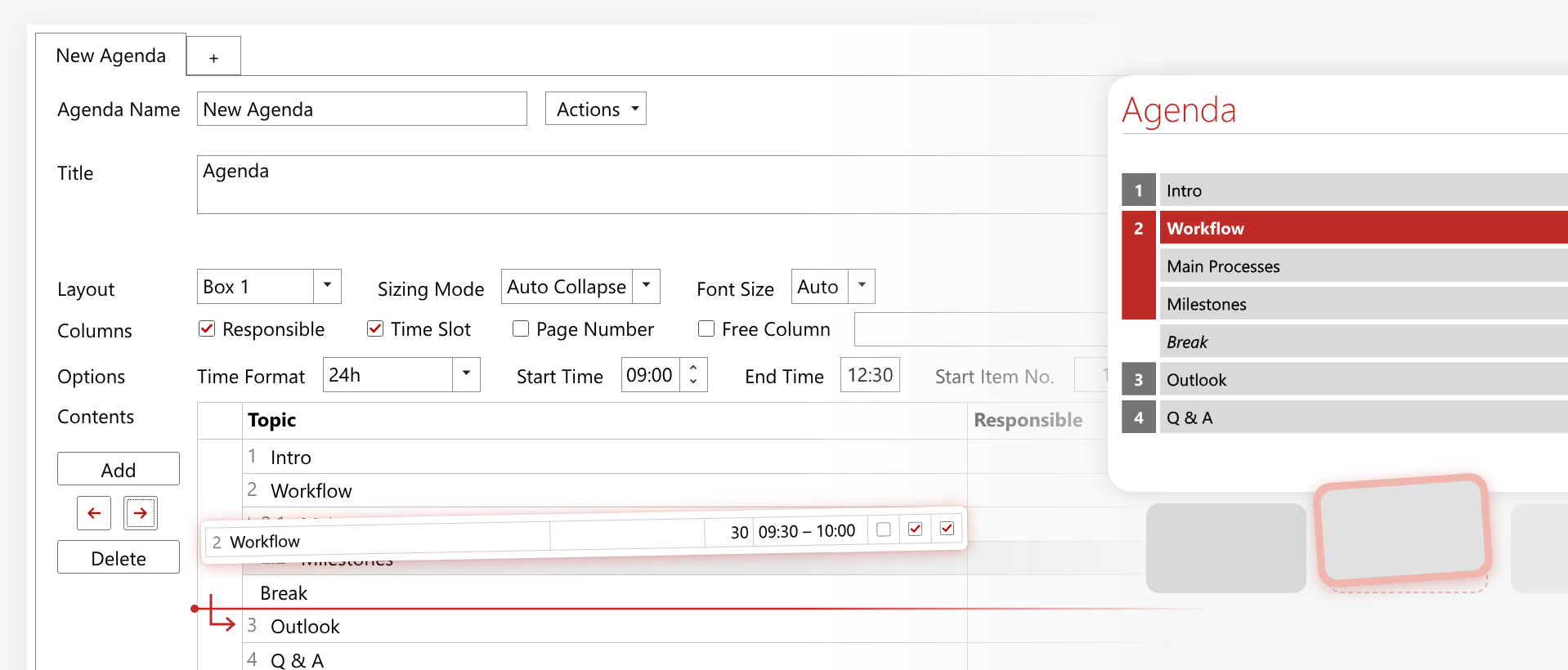

Build clear, structured agendas in seconds — so your team
spends less time preparing and more time achieving.
Keep meeting topics, timings, and responsibilities clearly structured so everyone knows what comes next.
Create professional agendas in seconds and reuse proven structures instead of rebuilding them for every meeting.
Make objectives, responsibilities, and progress visible so meetings become easier to follow and act on.
Build agenda slides with a flexible structure that keeps topics, timings, and responsibilities clear.
Adapt agenda items, timings, and meeting sections to fit the situation while keeping a clear and consistent layout.
Make ownership visible within the agenda so everyone knows who is responsible for each topic or follow-up.
Give discussion points, decisions, and next steps a clear place in the meeting structure so outcomes are easier to follow.
Combine the Agenda Wizard with other Efficient Elements tools to streamline workflows, save time, and keep your team on track. Explore more features and discover how they work together across your presentations.
Explore FeaturesWhenever you need structure in your presentation, whether it's for meetings, workshops or documentation. You can create agenda templates and reuse them for recurring meetings or events.
Yes. Add owners and time slots per item, so responsibilities are clear before the meeting starts.
Absolutely! The agenda helps you restructure your presentation in seconds using drag-and-drop and just a few clicks. The great thing is: The corresponding pages are moved directly along with the agenda items.
